Mitigation history
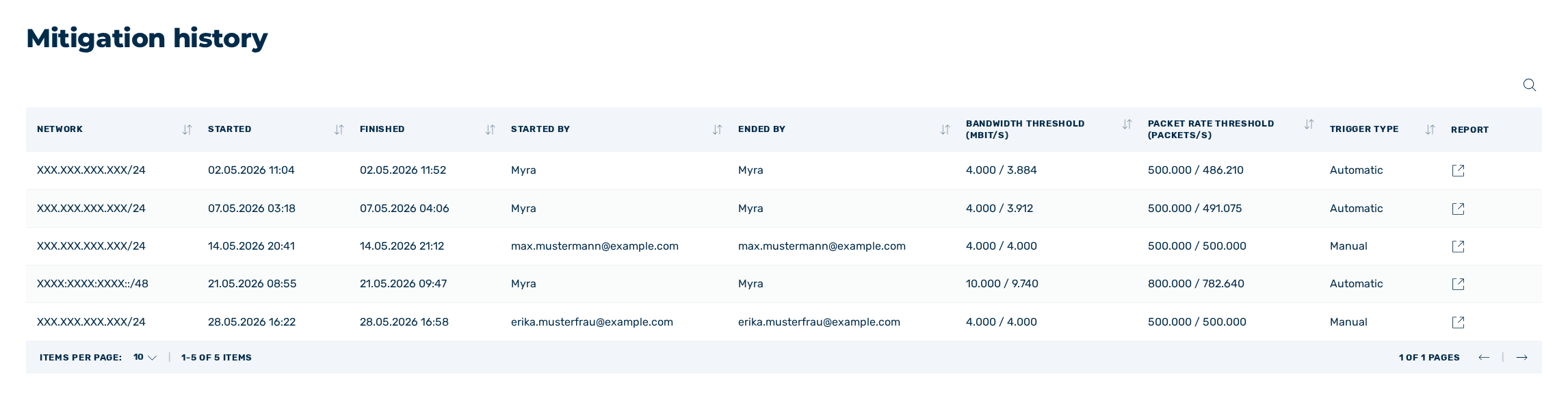
View Mitigation History
In the Mitigation history view, you can see an overview of all mitigations that have been triggered automatically or manually. You can retrieve a mitigation report for each completed mitigation.
The following information is available:
| Name | Definition |
|---|---|
| Network | The IP address of the network. |
| Started | The date and time when mitigation was initiated. |
| Finished | The date and time at which the mitigation was completed. |
| Started by | Indicates who initiated the manual mitigation. |
| Ended by | Indicates who stopped the manual mitigation. |
| Bandwidth Threshold (MBit/s) | Shows the defined bandwidth threshold and threshold exceedance during automatic mitigation. |
| Packet Rate Threshold (Packets/s) | Shows the defined packet rate threshold and threshold exceedance during automatic mitigation. |
| Trigger type | Indicates whether mitigation was started manually or automatically. |
| Report | Enables the mitigation report to be opened in a new window via the icon  . . |
The following options are available:
| Name | Definition |
|---|---|
 |
The icon enables you to search specifically for names, IP addresses, bandwidth, and packet rates. |