User details for <user name>
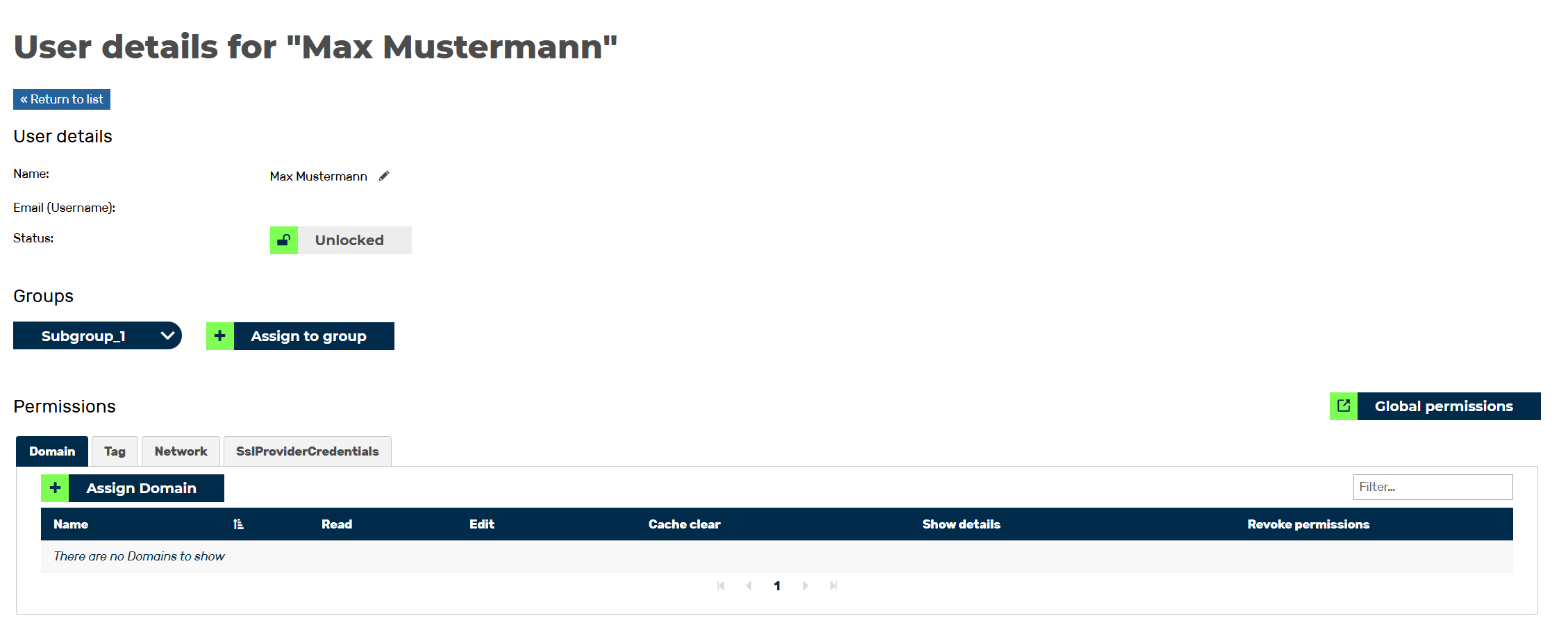
User details for <user name> view
In the User details for <user name> view, you can view and edit information for the selected user, as well as assign groups and permissions to the user.
The view includes the following areas:
- ■ User Details (1)
The following information is available:
| Name | Definition |
|---|---|
| Name | The name of the user. |
| Email (Username) | The email address that the account was registered under. |
| Status | Indicates whether the user's account is active or suspended. |
 |
The icon converts the user's name into two text fields where the name can be edited. |
- ■ Groups (2)
The following information is available:
| Name | Definition |
|---|---|
| Name of the group(s) | All groups to which a user is assigned are shown by name in this area. |
| Add to group | The button opens the Assign <User's email> to a group dialog to assign the user to a group. |
- ■ Permissions (3)
In the Permissions area, you can view the local and global permissions for the selected user.
The Global permissions button opens the Global permissions dialog for viewing all permissions that have been assigned to the user. Global permissions apply to all options that an account can view, add, edit, and delete in the following areas: (Domains),, (Tags),, and (Networks),, regardless of the assignment of specific entries. For more information, see section Section Global Permissions Option.
If the user has been assigned local permissions for the Domain, Tag, and Network areas, they are available divided into the Domain, Tag, and Network tabs with information on the individual permissions in the respective areas. For more information, see Section Local Permissions Area.
The following options are available:
| Name | Definition |
|---|---|
| Actions | Shows the possible options for editing the selected entry. The following options are available:
|
| Filter field | The field filters entries by permissions. |
 : Clicking on the icon deletes the selected permission.