Add Cache Rule / Edit Cache Rule dialog
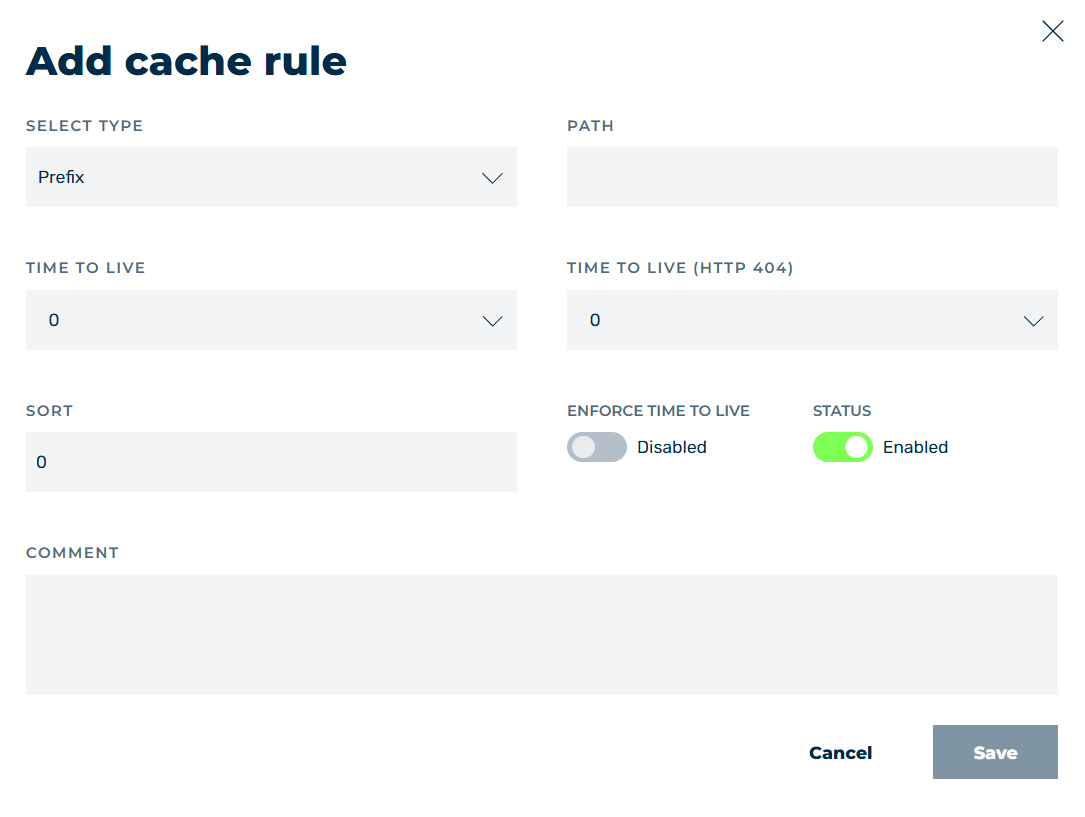
Add cache rule dialog
In the Add cache rule and Edit cache rule dialogs, you can add new cache rules or edit existing cache rules, depending on the selected option.
The following options are available in the dialog:
| Name | Definition |
|---|---|
| SELECT TYPE | Defines which part of the path should be cached. The following options are available:
.jpgvalue under Path match. |
| PATH | Defines one or more paths that should be cached. You can use regular expressions to map different paths.NoteOnly elements that deliver one of the following response codes are cached: 200 – Request was successful 300 – The requested resource exists in multiple variants 301 – A permanent redirect of a requested resource to a new URL 302 – A temporary redirectNoteThe hierarchy of the cache settings is as follows: Specific settings take precedence over general settings. Cache settings for individual subdomains take precedence over the general settings for all subdomains.Example /images/static/ takes priority over /images/ and can have different cache settings than the /images/ parent folder. |
| Time to live | Defines the time period in seconds during which files are kept in the cache. During this time, no request must be made to the origin server for the affected files.NoteIf 0 like origin server is selected as the lifetime, Myra uses the cache control header of your infrastructure for caching.NoteA value of -1 disables file caching. |
| TIME TO LIVE (HTTP 404) | The time period in seconds during which files with an origin response HTTP code 404 are kept in the cache.NoteIf 0 like origin server is selected as the lifetime, Myra uses the cache control header of your infrastructure for caching.NoteA value of -1 disables file caching. |
| Sort | Defines a number for positioning the entry in the sequence of all entries. |
| ENFORCE TIME TO LIVE | Defines the validity period of the cached object (Cache-Control: max-age) in the backend, regardless of the response sent by the client infrastructure, in order to enforce the validity period.NoteWhen ENFORCE TIME TO LIVE option from Myra is enabled, the lifetime of cache entries in the browser is controlled by the value specified in the TIME TO LIVE field. The following cases are possible: If your infrastructure does not provide a Cache-Control header, Myra sets the Cache-Control header with the max-age value itself and passes it on to the client. The value of max-age corresponds to the value defined in the TIME TO LIVE field. If your infrastructure already provides a value for max-age, Myra will override it with the value stored in the TIME TO LIVE field.NoteEnabling ENFORCE TIME TO LIVE only takes effect if a value other than 0 is entered in the TIME TO LIVE field.NoteForcing the cache TTL is not applied in case of a no-cache rule, such as cache control: (no-store\|no-cache\|private) or cache control: max-age=0. |
| STATUS | Defines whether the entry is enabled or disabled. |
| COMMENT | Defines a custom description of the entry. |
| Save | The button adds a new entry or changes it. |
| Cancel | The button closes the window without adding a new entry or changing an entry. |
Example
- ■ All files located under the
/examplepath exactly are cached for 2 minutes.
| Name | Definition | |
|---|---|---|
| Exact | /example |
2 minutes |
- ■ All files with the formats .pdf, .png, .html, or .json that exist under any of the paths of the domain are cached for one week.
| Name | Definition | |
|---|---|---|
| Ends with | .png |
- ■ The favicon is cached for one week. All other files that are also in
/resource/are still not taken into account.
| Name | Definition | |
|---|---|---|
| Exact | /resource/favicon.ico |
1 week |
- ■ All of the files of the domain are cached for 15 minutes, except.jpg files.
| Name | Definition | |
|---|---|---|
| Starts with | / |
15 minutes |
| Ends with | .jpg |
-1 |
Note
Whether a resource was delivered from the cache from Myra can be seen in the X-CDN header. This has the value1if the resource comes from the cache. An X-CDN header with the value 2 means that a stale object was delivered. If the resource is delivered directly from the origin server, the X-CDN header is not attached.
Note
With content management systems, caching can cause problems with non-static pages, for example logging into the admin panel.
This can be solved as follows: Set the caching settings so that the admin areas adopt the cache settings from your infrastructure.
Note
For more information about caching, see Section Set up Myra CDN.