Ticket Details
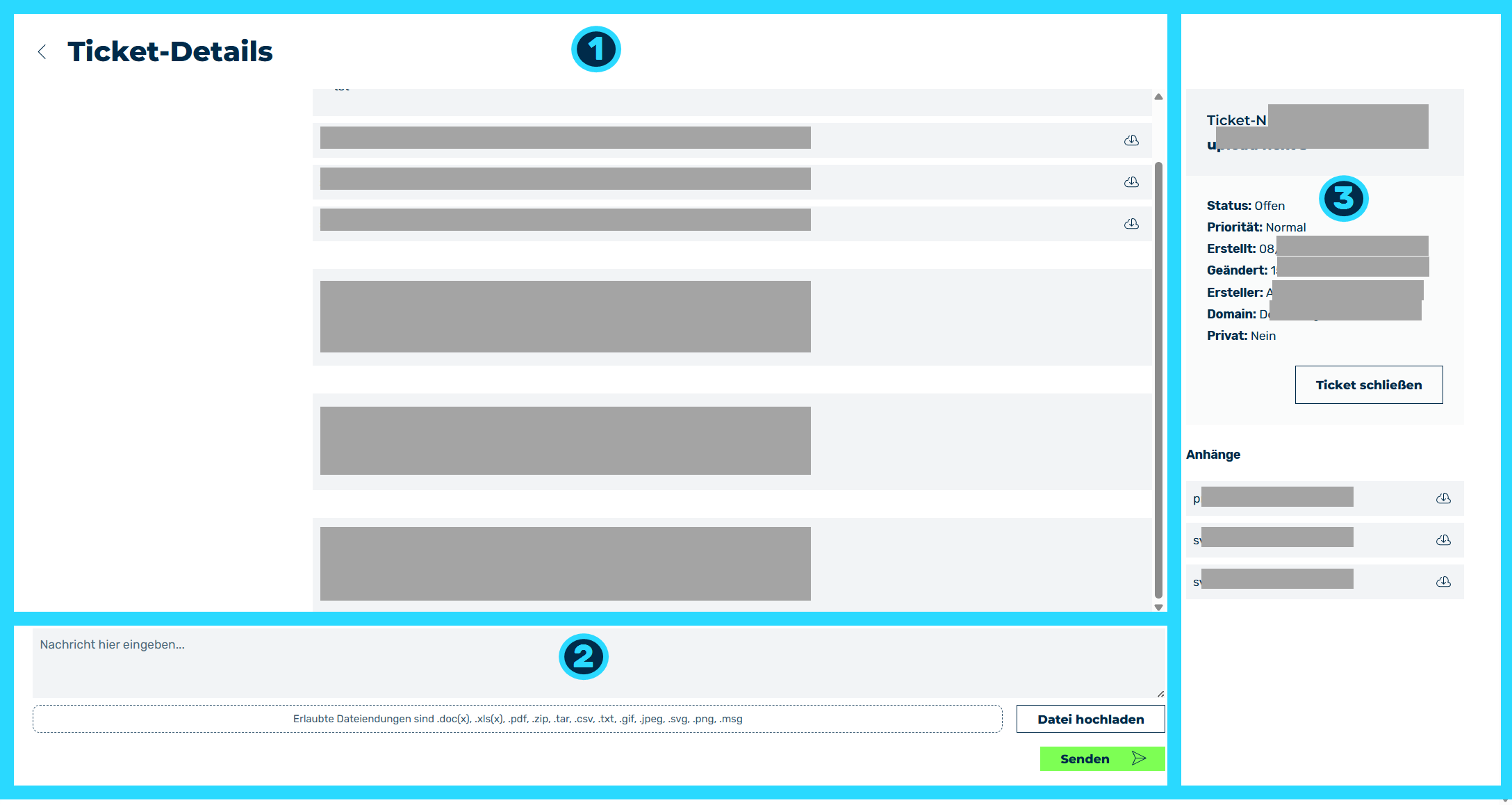
Show Ticket view
The link after the unique ticket number opens the Show Ticket view with details about the ticket, such as a message history or information on the current status of the ticket.
The ticket view includes the following areas:
- ■ Overview of all sent and received messages (1)
In the message overview, you'll find all the correspondence related to your ticket.
Each message contains the following information:
- Sender's Name and Email Address
- Date and time of the message
-
Attachments (optional)
-
■ Post area for new messages (2)
To reply to a message from the Myra Support Team, you can compose new messages and attach files in the compose area.
The following options are available:
| Name | Definition |
|---|---|
| Messages area | Create a new message, which will appear in the message overview when you click on the Send button. |
| Drag-and-Drop Field | Attach files up to 5 MB in size to the ticket.NoteThe permitted file extensions include .doc(x), .xls(x), .pdf, .zip, .tar, .csv, .txt, .gif, .jpeg, .svg, .png, and .msg |
| Upload File | Attach files up to 5 MB in size to the ticket.NoteThe permitted file extensions include .doc(x), .xls(x), .pdf, .zip, .tar, .csv, .txt, .gif, .jpeg, .svg, .png, and .msg |
| Send | The button adds a message. |
- ■ Information on the ticket (3)
The information box provides an overview of the ticket and its status.
The following information is available:
| Name | Definition |
|---|---|
| Ticket # | The unique number of the ticket. |
| Subject field | The subject of the inquiry, which was assigned when the ticket was created. |
| Status |
|
| Priority | The priority of the ticket. The following values are available:
|
| Created | The date and time the ticket was created. |
| Modified | The date and time that the ticket was last edited at. |
| Creator | The name of the person who creates the ticket. |
| Domain | The assignment of the ticket to a specific domain or subdomain. |
| Private | Shows whether the ticket is private (that is, can only be viewed by the creator). |
| Close Ticket | The button opens the Close this ticket? dialog to close the ticket.NoteA closed ticket cannot be reopened. To reopen a closed ticket, create a new ticket. |
| List of files | Shows a list of attached files. |