Create Ticket dialog
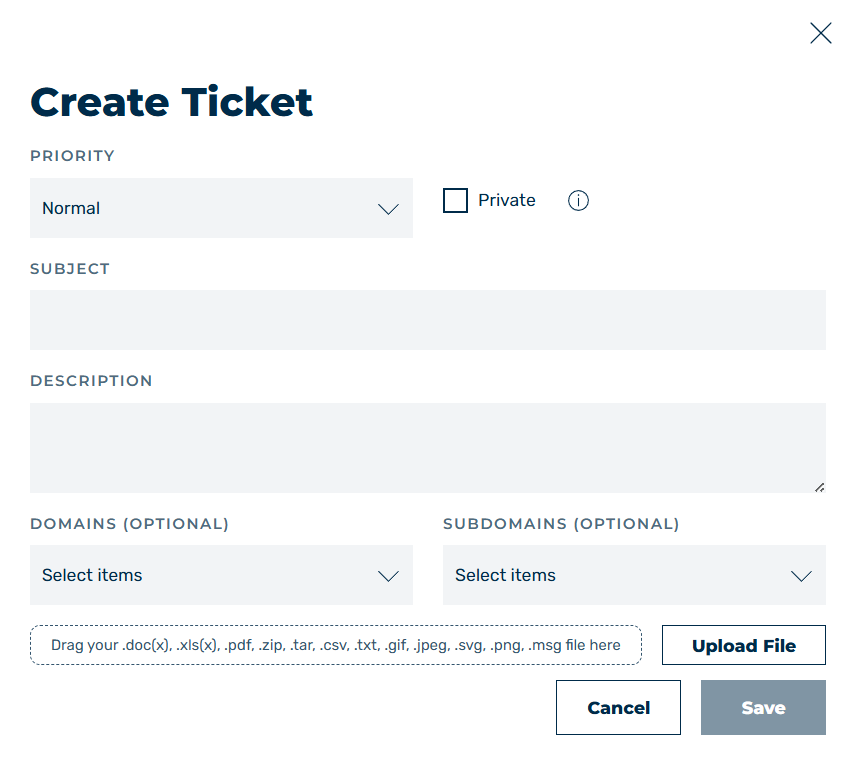
Create Ticket dialog
The Create Ticket button opens the Create Ticket dialog with a form for creating a new request to Myra Support.
The following options are available:
| Name | Definition |
|---|---|
| Priority | Defines the urgency of the request. The following values are available:
|
| Private | The checkbox enables or disables whether the ticket is private (that is, can only be viewed by the creator). |
| Subject | Defines the title of the ticket for better classification of the request. |
| Description | A description of the problem. |
| Domain (Optional) | Defines the assignment of the ticket to a domain. The following values are available:
|
| Subdomain (Optional) | Defines the assignment of the ticket to a subdomain. The following values are available:
|
| Drag-and-Drop Field | Attach files up to 5 MB in size to the ticket.NoteThe permitted file extensions include .doc(x), .xls(x), .pdf, .zip, .tar, .csv, .txt, .gif, .jpeg, .svg, .png, and .msg |
| Upload File | Attach files up to 5 MB in size to the ticket.NoteThe permitted file extensions include .doc(x), .xls(x), .pdf, .zip, .tar, .csv, .txt, .gif, .jpeg, .svg, .png, and .msg |
| Save | The button creates the ticket. |
| Cancel | The button discards all changes to the ticket and closes the form. |
Note
Please note that tickets are only processed during normal business hours.
In the event of urgent emergencies covered by your contract, please always call our 24/7 support hotline.