Setting an HTTP status and redirecting
Warning
A plain HTTP status code without a redirect target cannot be set via a WAF rule.
A WAF rule with the Set HTTP Status action allows you to redirect requests with a status code and a target URL.
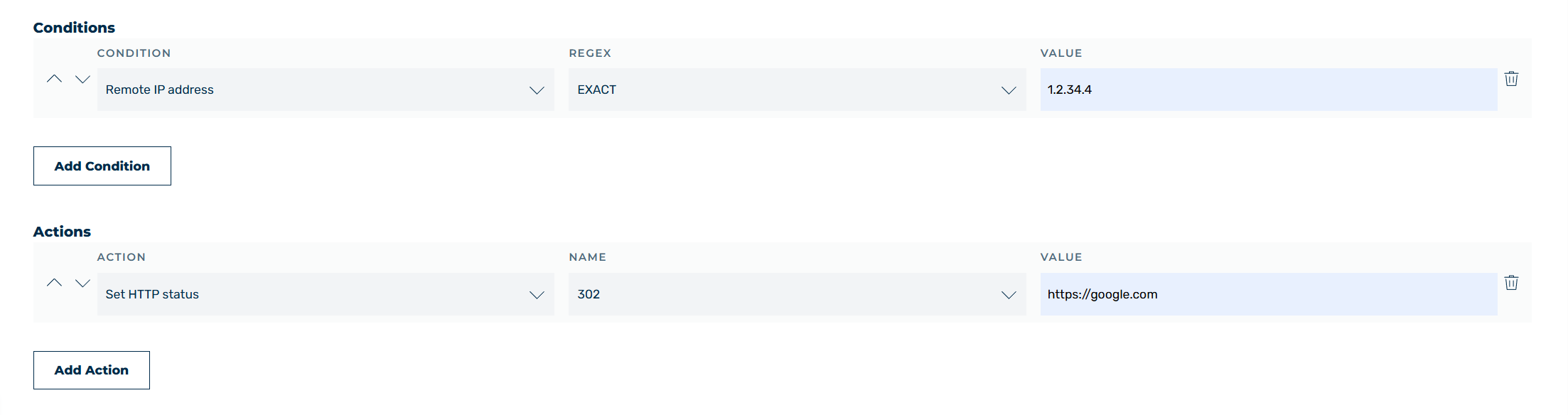
Rule: Redirect via HTTP status
For example, proceed as follows to redirect requests from a specific IP address to a maintenance page:
- ► Select Request as the request method.
- ► Add the Remote IP condition.
- ► Select the EXACT operator from the drop-down list.
- ► Enter
1.2.34.4as the value. - ► Add the Set HTTP Status action.
- ► Select
302as the status code. - ► Enter the target URL
https://google.comas the value.