Add new DNS record / Edit DNS record dialog
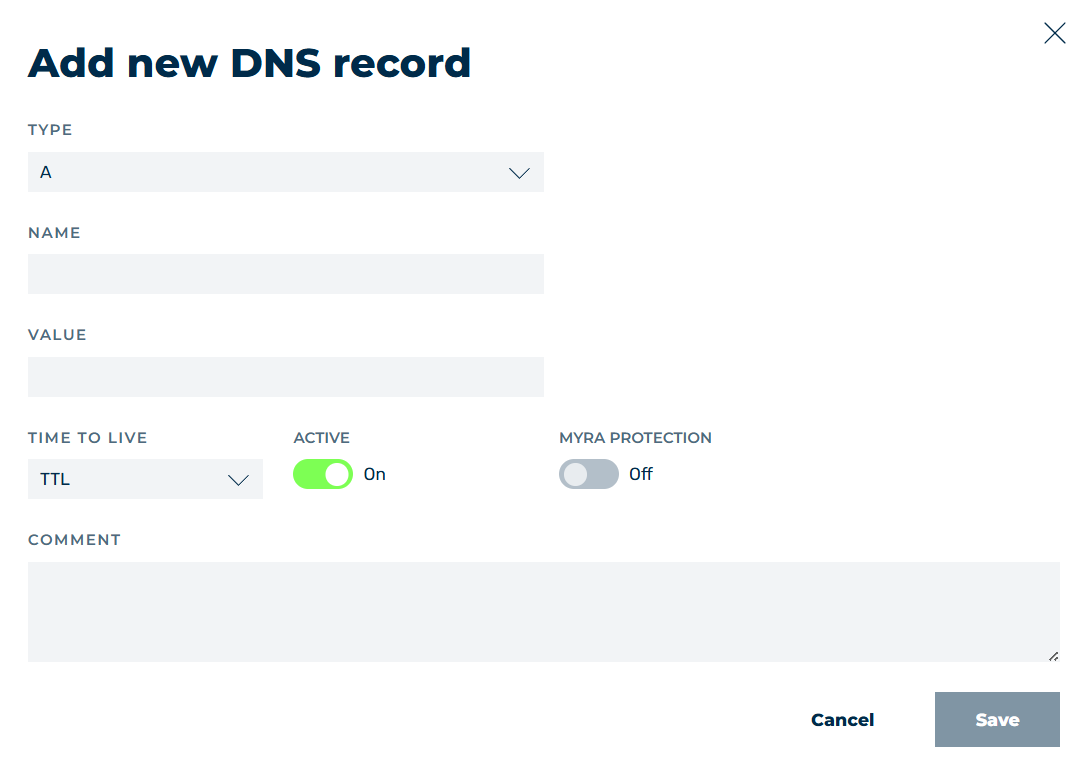
Add new DNS record dialog
In the Add new DNS record and Edit DNS record dialogs, you can add new DNS records or edit existing DNS records, depending on the selected option.
Which fields the dialog shows depends on the selected record type. The TYPE, NAME, VALUE, TIME TO LIVE, ACTIVE and COMMENT fields are shown for every record type, all other fields only for the record types named below.
The following options are available:
| Name | Definition |
|---|---|
| TYPE | Defines the record type of the DNS record. The following record types are available:
|
| NAME | Defines the name of the DNS record. Myra recommends choosing this so that it matches the domain / subdomain name.NoteUp to 63 characters are permitted.NoteFor the PTR record type, the field needs a valid IPv4 address. |
| VALUE | Defines the IP address or domain name of the selected DNS record.NoteThe field is mandatory.NoteFor the A record type, a valid IPv4 address is necessary. For the AAAA record type, a valid IPv6 address is necessary. |
| PRIORITY | Defines the order in which the targets are queried. The lowest value takes precedence.NoteThe field is only shown for the MX and SRV record types.NoteThe permitted value is a number from 0. |
| WEIGHT | Defines the weighting among several targets with the same priority. The higher the value, the more requests the target receives.NoteThe field is only shown for the SRV record type.NoteThe permitted value is a number from 0. |
| PORT | Defines the port on which the service is available on the target.NoteThe field is only shown for the SRV record type.NoteThe permitted value is a number from 0. |
| FLAGS | Defines the flag of the CAA record. The values 0 to 7 are permitted.NoteThe field is only shown for the CAA record type and is mandatory there. |
| RECORD TYPE | Defines the statement that the CAA record makes. The following values are available:
|
| ID | Defines the key tag, that is, the identifier of the key that the DS record refers to.NoteThe field is only shown for the DS record type and is mandatory there.NoteThe permitted value is a number from 0. |
| ENCRYPTION | Defines the algorithm of the key that the DS record refers to. The following values are available:
|
| HASH TYPE | Defines the hash procedure that was used to create the fingerprint of the key. The following values are available:
|
| TIME TO LIVE | Defines the duration that a DNS record is cached for before it is queried again. The following values are available:
|
| ACTIVE | The switch activates or deactivates the DNS record.NoteThe switch is activated when you add a DNS record. |
| MYRA PROTECTION | The switch activates or deactivates the Myra protection. The switch shows the On or Off state.NoteThe switch is only shown for the A, AAAA and CNAME record types.NoteThe switch is deactivated when you add a DNS record. |
| COMMENT | Assigns an individual comment. Up to 255 characters are permitted. |
| Save | The button adds the entry or saves the change.NoteThe button is disabled while you have not made a change, or while a field contains a value that is not permitted. |
| Cancel | The button closes the window without adding a new entry or saving an existing entry. |
Note
If a mandatory field is empty or contains a value that is not permitted, a message shows below the field, for example Please enter a valid value in the Value field, Please enter a valid IPv4 address, The value cannot be less than 0, or The value cannot exceed 7.