Notification Center
Note
Only notifications regarding current topics, issues, or errors are shown.
The notifications are updated only every 4 hours. If you recently solved an issue, the notification disappears from the list with the next update.
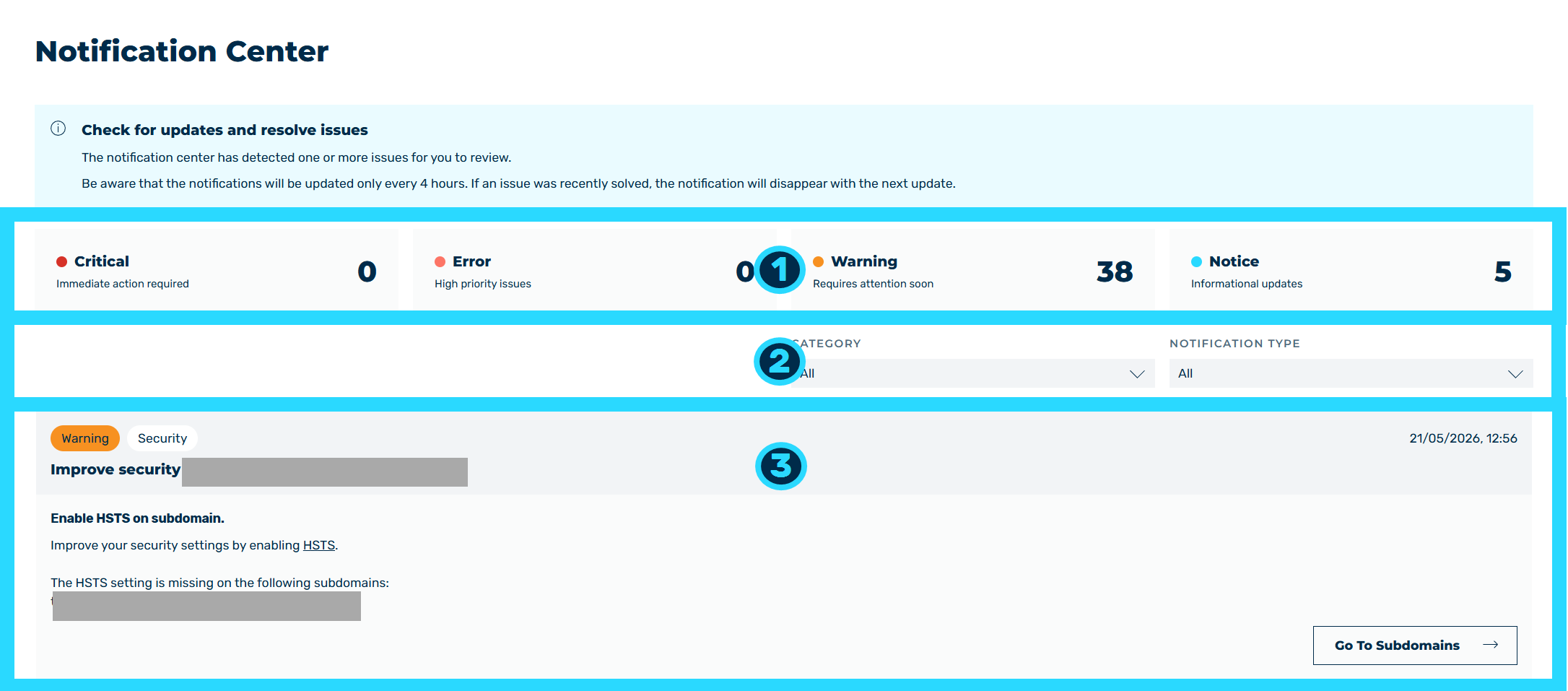
Notification Center view
In the Notification Center view, you are informed of problems in your account (for example expired SSL/TLS certificates or missing settings). You can also access the Notification Center using the  icon in the top bar.
Above the view, the Check for updates and resolve issues information box shows. The information box indicates that the notification center has detected one or more issues for you to review.
The view includes the following areas:
- ■ Overview of notification types, including the number of notifications currently available (1)
- ■ Selection area for filtering notifications by category and notification type (2)
- ■ Notifications area (3)
In the overview, a tile with the number of the notifications currently available shows for each notification type.
The following notification types are available:
| Name | Definition |
|---|---|
| Critical | Notifications that indicate critical errors that must be resolved immediately. The tile includes the Immediate action required addition. |
| Error | Notifications that indicate errors that must be resolved. The tile includes the High priority issues addition. |
| Warning | Notifications that indicate issues that must be resolved promptly. The tile includes the Requires attention soon addition. |
| Notice | Notifications that do not indicate any problems but contain useful information. The tile includes the Informational updates addition. |
The following options are available in the selection area:
| Name | Definition |
|---|---|
| Category | The drop-down list filters the notifications by the category. The following values are available:
|
| Notification type | The drop-down list filters the notifications by the notification type. The following values are available:
|
Note
If no notifications are available, the Notifications will appear here as soon as there's something for you. text shows in the notifications area.
A notification has the following structure:

Structure of a Notification
-
■ Title, including type of notification and date (1)
-
■ Brief description with detailed information and a button to go directly to the corresponding setting (2)
The following information is available:
| Name | Definition |
|---|---|
| Notification type | The tag shows the notification type: Critical, Error, Warning, or Notice. |
| Category | The tag shows the category: Security, Certificates, Configuration, Performance, Trial, or Other. |
| Date | The date that the notification was created on. |
| Title | The title of the notification. |
| Brief description | The brief description of the notification. |
| Description | The detailed description of the notification. |
| Go To | The button opens the view that lets you resolve the reported issue.NoteThe button only shows if a view is available for the notification. The label of the button gives the target, for example Go To Certificate Management, Go To Subdomains, Go To Load Balancing, Go To Build Status, Go To User Management, Go To Session Management, Go To Statistics, Go To Rollback, or Go To Report. |