Account Security tab
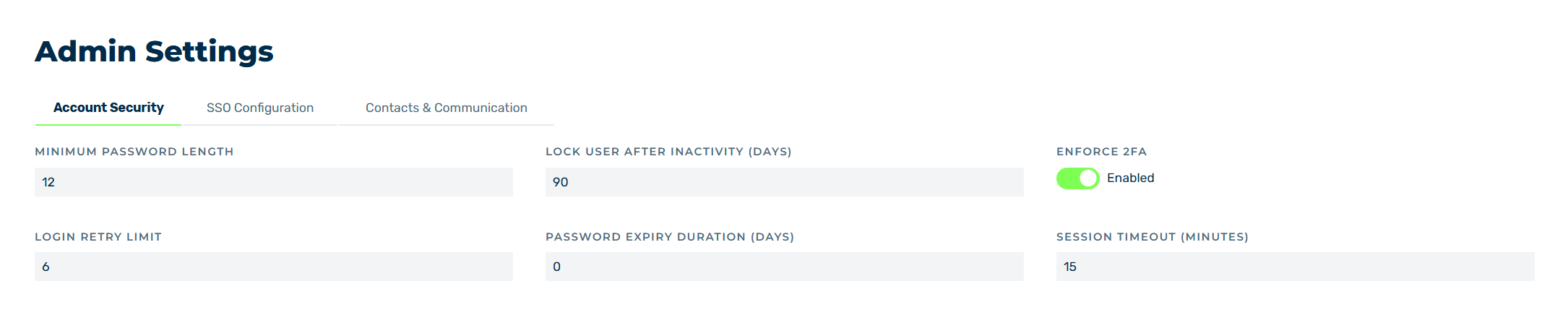
Account Security tab
In the Account Security tab, you can define the most important settings for securing the accounts of the users.
The following options are available:
| Name | Definition |
|---|---|
| MINIMUM PASSWORD LENGTH | The minimum required length of a password for the accounts of the users.NoteThe password must be at least 12 characters long and contain at least one uppercase letter, one number, and one special character. The minimum password length may change depending on your organization’s requirements. |
| LOCK USER AFTER INACTIVITY (DAYS) | The duration in days that an inactive user still has access to the Myra App for. The user’s account will be locked once the defined duration has elapsed. |
| ENFORCE 2FA | Determines whether two-factor authentication is enforced for every user. |
| LOGIN RETRY LIMIT | The number of failed login attempts before the account of a user is locked. |
| PASSWORD EXPIRY DURATION (DAYS) | The duration in days after which the user must set a new password. |
| SESSION TIMEOUT (MINUTES) | The duration in minutes that an inactive session is allowed to access the Myra App for. If the session does not access the Myra App again during this time, the user will be logged out. |
| Save | The button saves the settings. |
| Reset | The button resets all the values to the most recently saved values. |