Rate limit via a WAF rule
A WAF rule with the Rate limit action allows you to define a rate limit that applies to various conditions and takes effect independently of the request limit in the settings. This allows you, for example, to limit login attempts or the use of a contact form.
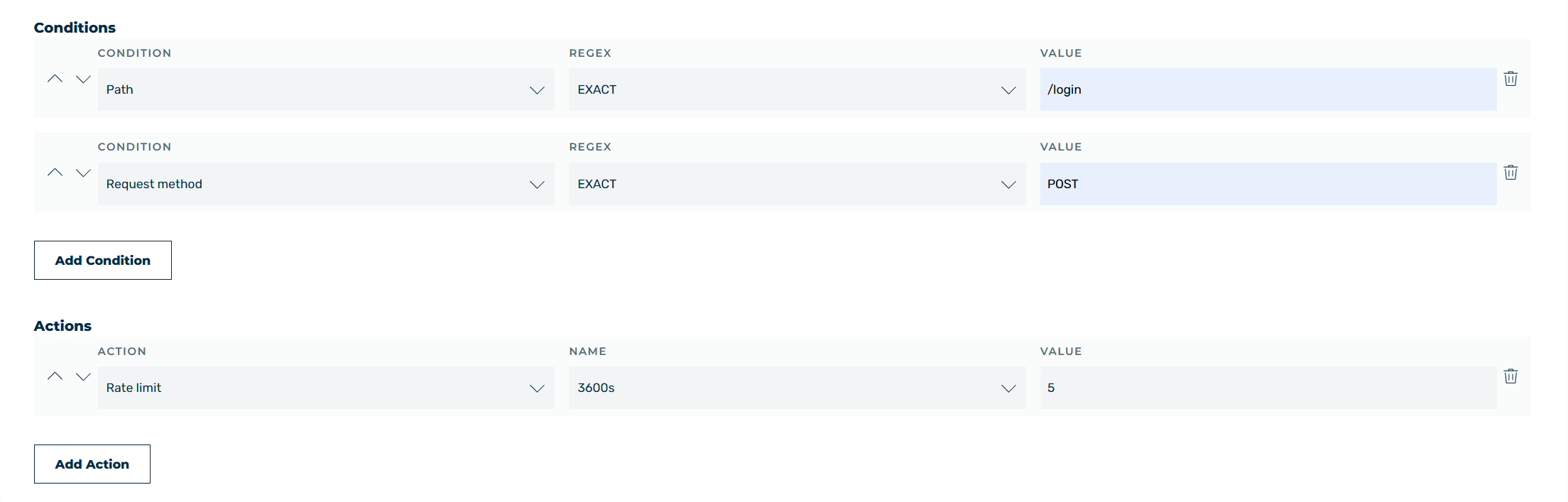
Action: Rate limit for login requests
For example, proceed as follows to limit login attempts:
- ► Select Request as the request method.
- ► Add the Path condition.
- ► Select the EXACT operator from the drop-down list.
- ► Enter
/loginas the value. - ► Add the Request method condition.
- ► Select the EXACT operator from the drop-down list.
- ► Enter
POSTas the value. - ► Add the Rate limit action.
- ► Enter
3600as the time in seconds in the first field. - ► Enter
5as the permitted number of requests in the second field.
Note
Specify the time only as a number in seconds, without a time unit. A drop-down list is now also available for this. By default, the request is answered with HTTP 429, but this can be changed to CAPTCHA.