SSO Configuration tab
Note
Myra’s Single Sign-On (SSO) does not support Just-In-Time (JIT), which simultaneously creates a new account when logging into the Myra App using SSO for the first time.
Note
All users must already be created in the Myra App to use Single Sign-On (SSO).
Note
The email addresses of users in the Myra App must match the email addresses stored in your Identity Provider (IdP) to be able to use Single Sign-On (SSO) for your organization.
Note
Permissions for the Myra App are not granted through your Identity Provider (IdP), but rather through user management in the Myra App (see Section Permission views ).
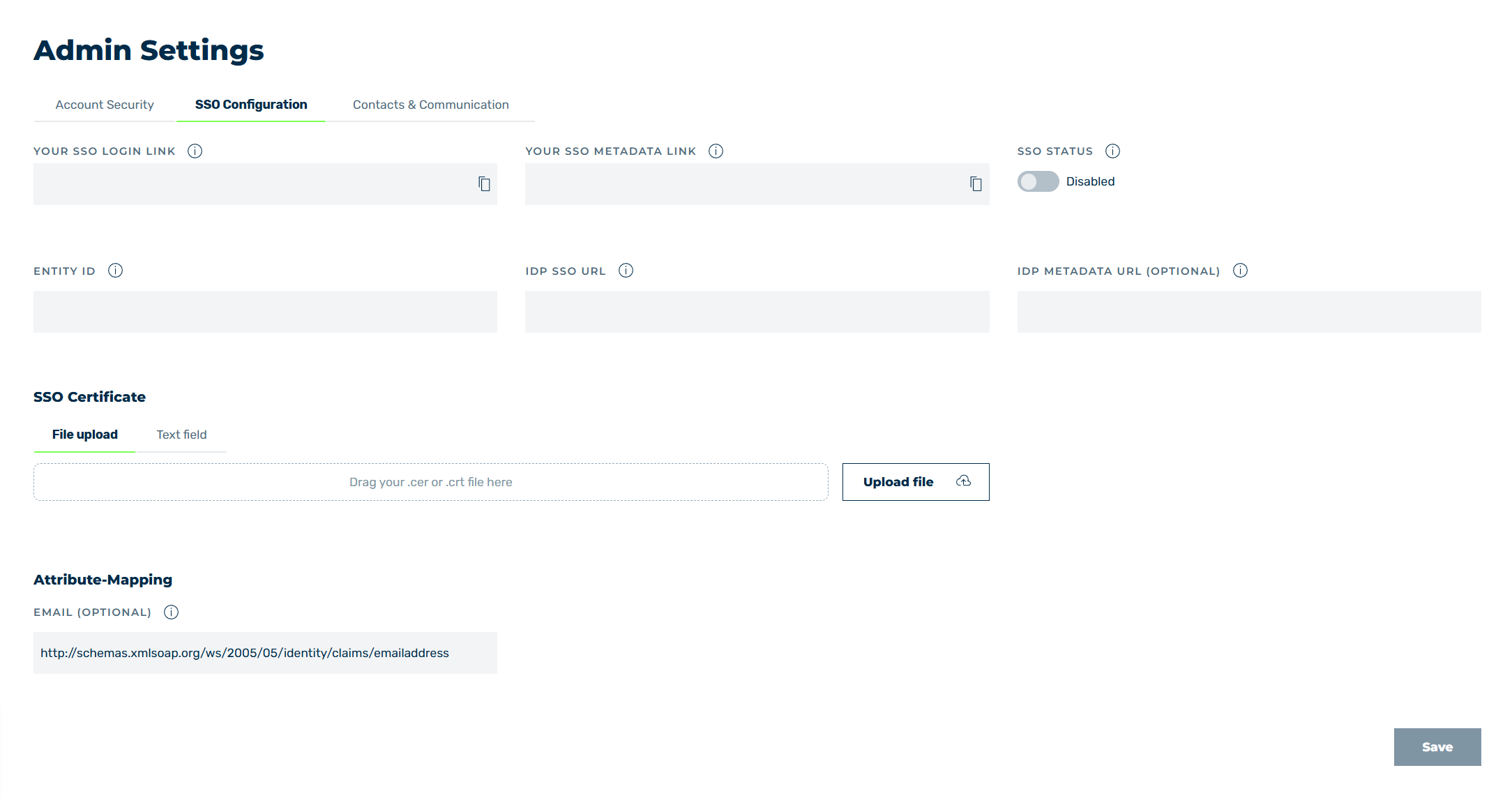
SSO Configuration tab
In the SSO Configuration tab, you can enable single sign-on (SSO) for your organisation by storing the identity provider (IdP) of your organisation for SSO access.
The following options are available:
| Name | Definition |
|---|---|
| YOUR SSO LOGIN LINK | The SSO login link for logging into the Myra App using SSO.
apiv2.myracloapiv2.myracloud.com/saml/login?uuid=You can copy the links to the clipboard using the  icon.NoteSave the SSO login link as a bookmark in your web browser or store it on your Identity Provider’s (IdP’s) homepage. icon.NoteSave the SSO login link as a bookmark in your web browser or store it on your Identity Provider’s (IdP’s) homepage. |
| YOUR SSO METADATA LINK | The SSO metadata link that must be stored with your IdP to configure Myra’s SAML Service Provider (SP) as a trusted application.Exampleapiv2.myracloapiv2.myracloud.com/saml/metadata?uuid=You can copy the links to the clipboard using the icon.NoteThe SSO metadata link is stored in the SAML metadata file where the Service Provider (SP) for Single Sign-On (SSO) must be configured. |
| SSO STATUS | The switch enables or disables SSO access for your organisation’s users.
|
| ENTITY ID | Your IdP’s unique identifier.NoteThis is generally a URL or URI that matches the EntityID attribute in your IdP’s SAML metadata file. Alternatively, the identifier can also form part of your IdP’s SAML app setting.Examplehttps://loghttps://login.microsoftonline.com// |
| IDP SSO URL | Your IdP’s SSO URL that authentication requests should be sent to.NoteIn your IdP’s SAML metadata file, identified with the SAML Endpoint or Login URL attribute.Examplehttps://loghttps://login.microsoftonline.com//saml2 |
| IDP METADATA URL (OPTIONAL) | The link to your IdP’s SAML metadata file.NoteThis SAML metadata file contains the following information: SSO URL SSO Certificates Entity ID You can usually find this file in your Identity Provider’s (IdP’s) SAML app settings.NoteThe SAML metadata file is optional. If you do enter the SAML metadata file, we will use it as a backup to review your settings if there is a problem and correct them if necessary. |
| SSO Certificate | Uploads an SSO certificate as a certificate file or text.
|
| Upload file | The button opens a dialog for selecting files on your computer. |
| Attribute-Mapping | The area groups the mapping of the SAML attributes. The area contains the EMAIL (OPTIONAL) field. |
| EMAIL (OPTIONAL) | The name of the SAML attribute that your IdP uses for the user’s email address. The following values are common:
http://schemas.xmlsoap.org/ws/2005/05/identity/claims/emailaddress to transmit the email address. If your IdP deviates from the default value, enter the exact name of the attribute that transmits the email address in the field. |
| Save | The button saves the settings. |