Add cache entries
In order for your objects to be cached, you must define the domain and subdomain from which you want to cache objects and add at least one entry in the cache settings for your created domains and subdomains.
Proceed as follows to add a cache entry:
- ► Open the Cache Settings view, see Section Cache settings.
- ► Click on the Add cache rule button.
- ↳ The Add cache rule dialog opens.
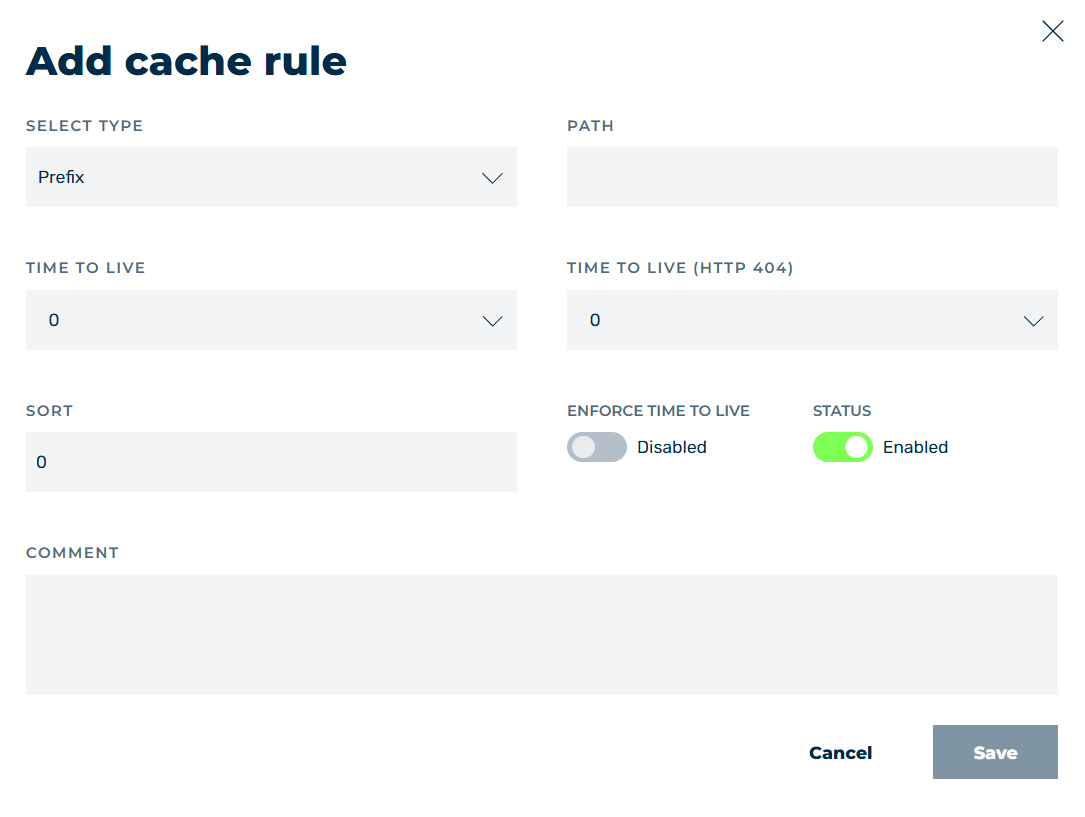
Add cache rule
- ► In the drop-down list under TYPE, define which part of the path should be cached, see Section Add Cache Rule / Edit Cache Rule dialog.
-
► In the text field under Path enter the path for the objects that are to be cached.
Note
Only elements that deliver one of the following response codes are cached:
- 200 – Request was successful
- 300 – The requested resource exists in multiple variants
- 301 – A permanent redirect of a requested resource to a new URL
- 302 – A temporary redirect
-
► Use the drop-down list under TIME TO LIVE to define the length of time in seconds that the files are to be retained in the cache. During this time, no request must be made to the origin server for the affected files.
Note
If 0 like origin server is selected as the lifetime, Myra uses the cache control header of your infrastructure for caching.
Note
A value of -1 disables file caching.
-
► Use the drop-down list under TIME TO LIVE (HTTP 404) to define the time period in seconds that files with an Origin Response HTTP code of 404 are retained in the cache.
Note
If 0 like origin server is selected as the lifetime, Myra uses the cache control header of your infrastructure for caching.
Note
A value of -1 disables file caching.
-
► In the text field under SORTING enter a number for the position of the entry in the order of all entries.
-
► If necessary, enable the switch under ENFORCE TIME TO LIVE to allow the TTL set in Myra to override the cache TTL (
Cache-Control: max-age) of your infrastructure.Note
Forcing the cache TTL is not applied in case of a
no-cacherule, such ascache control: (no-store|no-cache|private)orcache control: max-age=0.Note
When ENFORCE TIME TO LIVE option from Myra is enabled, the lifetime of cache entries in the browser is controlled by the value specified in the TIME TO LIVE field.
The following cases are possible:
- If your infrastructure does not provide a Cache-Control header, Myra sets the Cache-Control header with
the max-age valueitself and passes it on to the client. The value ofmax-agecorresponds to the value defined in the TIME TO LIVE field. - If your infrastructure already provides a value for
max-age, Myra will override it with the value stored in the TIME TO LIVE field.
Note
Enabling ENFORCE TIME TO LIVE only takes effect if a value other than 0 is entered in the TIME TO LIVE field.
- If your infrastructure does not provide a Cache-Control header, Myra sets the Cache-Control header with
-
► If necessary, enter an individual comment in the COMMENTS text field.
- ► Click on the Save button.
- ➔ The dialog closes and the entry appears in the list of cache entries.
Repeat the process for all objects that are to be cached.