Matching fingerprints
A WAF rule with the Fingerprint condition allows you to identify clients based on their fingerprint. You match the fingerprint fp1 directly via the Fingerprint condition. For the fingerprints fp2 or fp3, specify the value with the fp2: or fp3: prefix.

Condition: Match fingerprint fp3
For example, proceed as follows to match the fingerprint:
- ► Select Request as the request method.
- ► Add the Fingerprint condition.
- ► Select the EXACT operator from the drop-down list.
- ► Enter
fp3:A=nd6dCdBnLbas the value.
Fingerprint with an exception for a user agent
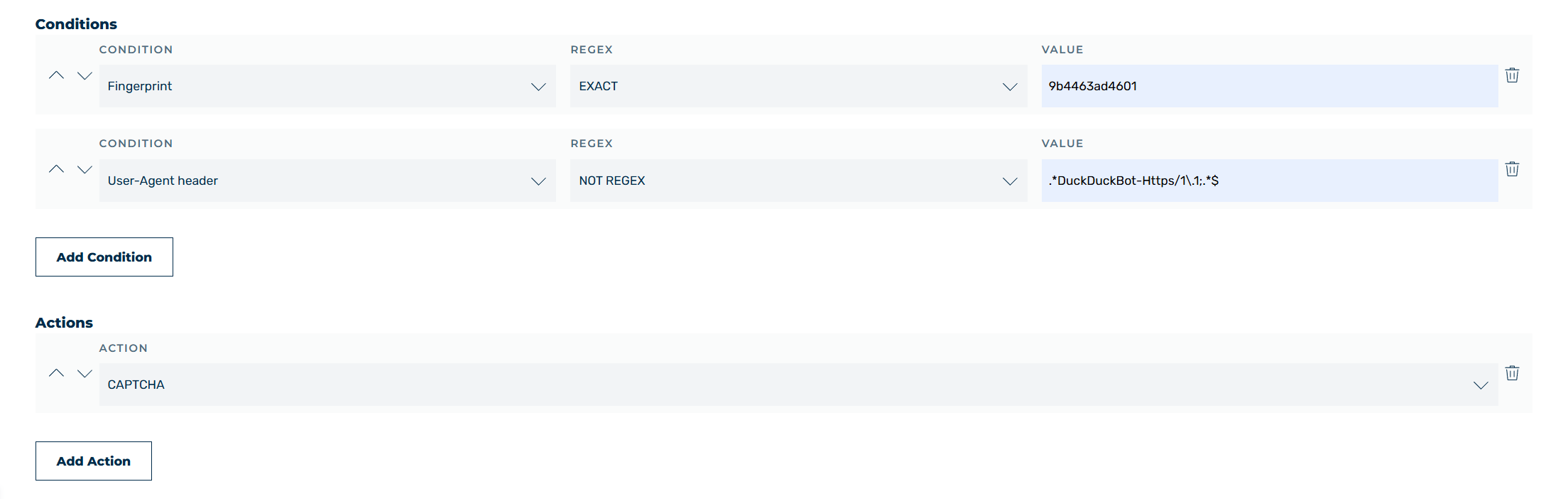
Fingerprint with a user agent exception
For example, to match a fingerprint without including a specific legitimate user agent, combine two conditions:
- ► Select Request as the request method.
- ► Add the Fingerprint condition.
- ► Select the EXACT operator from the drop-down list.
- ► Enter
9b4463ad4601as the value. - ► Add the User Agent Header condition.
- ► Select the NOT REGEX operator from the drop-down list.
- ► Enter
.*DuckDuckBot-Https/1\.1;.*$as the value. - ► Add the CAPTCHA action.