Customize the communication matrix
When you create a contact in the Myra App, no role is assigned to that contact. To ensure that Myra can contact this person for future technical inquiries or in an emergency, and to receive SSL/TLS reminders, the necessary permissions must be assigned to them.
Proceed as follows to assign a role to a contact:
- ► Open the Admin Settings view, see Section Admin Settings.
- ► Click on the Contacts & Communication tab.
- ↳ The Contacts & Communication tab opens with the Contact list tab already open.

Contacts & Communication tab
- ► Click on the Communication matrix tab.
- ↳ The Communication matrix tab opens.
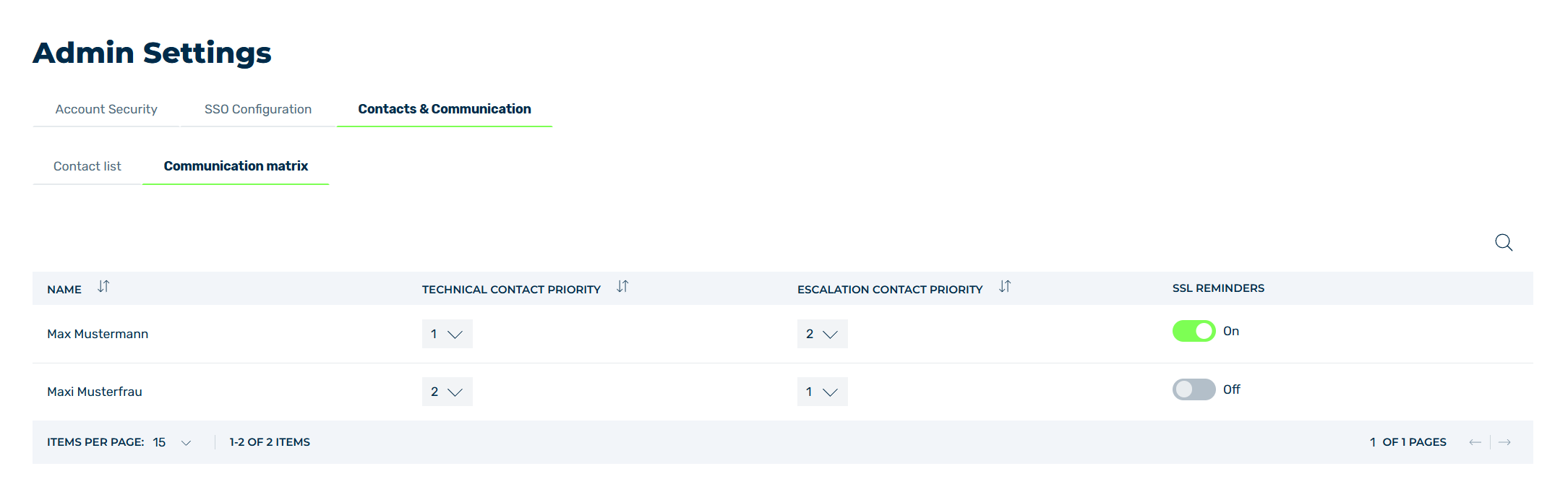
Communication matrix tab
- ► Select the contact you want to remove.
-
► If you want to designate the contact as a technical contact or emergency contact, select a value from the respective drop-down list: 1 or 6.
A value of - disables the respective contact type.
Note
The numerical values from 1 (contact first) to 6 (contact last) for the contact type setting define the priority order in the event of an incident.
-
► If you want to enable SSL/TLS reminders for this contact, click on the checkbox in the SSL/TLS REMINDERS column.
- ► Repeat this process for all contacts.
- ➔ Every time a value is changed, the settings are automatically saved. You do not need to do anything else.