Analysis World Map
Analysis World Map
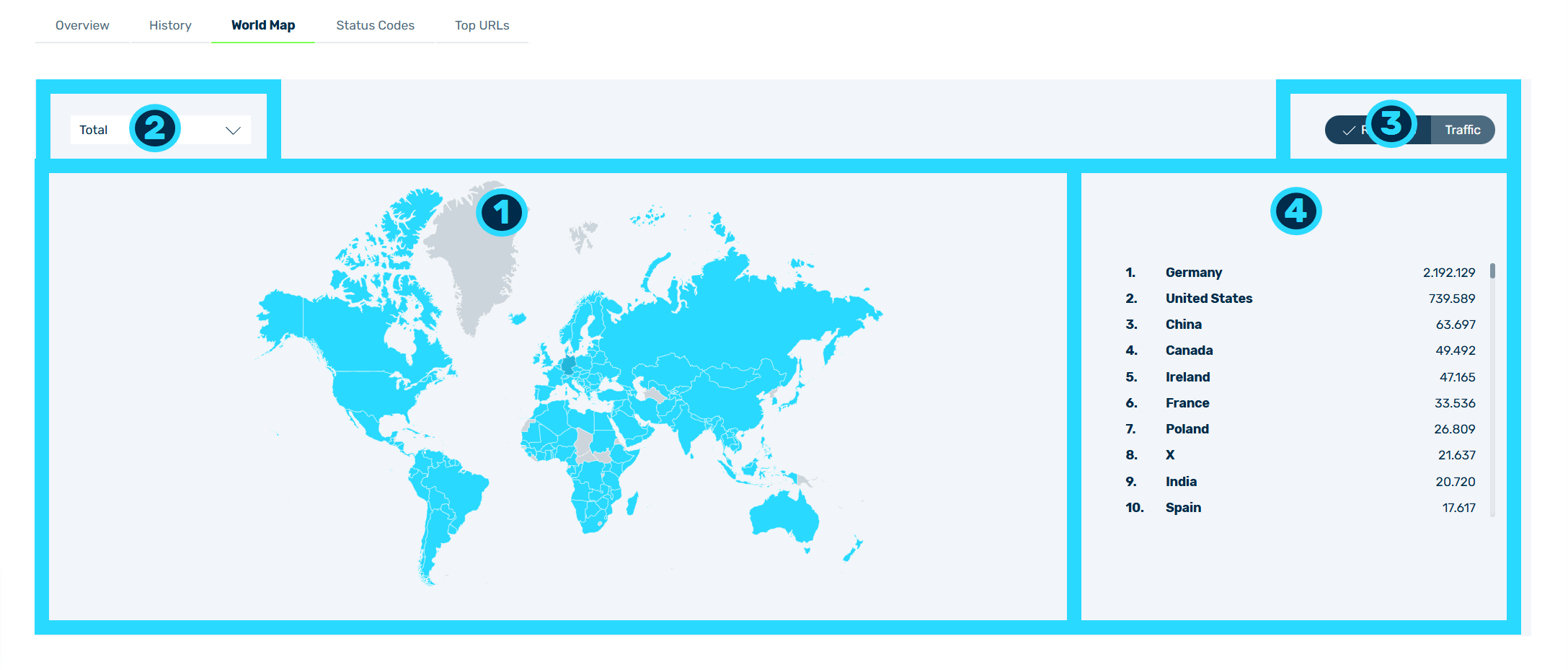
The World Map analysis provides you with a geographical overview of the origin of requests and traffic for the selected domains and subdomains during the selected time period.
The analysis includes the following areas:
- ■ Graphical representation of the world map (1)
| Name | Definition |
|---|---|
| Areas shaded in blue | Shows the countries from which requests and traffic were recorded.NoteThe country with the highest value is highlighted in a different colour. |
| Grey areas | Shows countries from which no requests or traffic have been recorded. |
- ■ Drop-down list for the selection of the request type (2)
- ■ Button group to change between Requests and Traffic (3)
- ■ List of the countries, sorted by value (4)
The following values are available in the drop-down list:
| Name | Definition |
|---|---|
| Total | Shows all requests or the total traffic. |
| Cached | Shows the requests or the traffic that were answered from the cache. |
| Uncached | Shows the requests or the traffic that were not answered from the cache. |
| Blocked | Shows the requests that were rejected. |
| Redirects | Shows the requests that were redirected. |
Default value: Total
Note
The Requests / Traffic button group only shows if both views are available for the selected value. For the Blocked and Redirects values, it does not show.
By default, the Requests button is selected. If you select a different value in the drop-down list, the button group is set to Requests again.
The list of the countries is sorted by the selected value in descending order and shows the rank, the name, and the value for each country. If you point to a country on the world map, a tooltip with the name of the country and the value shows.